
How To Set Daily Step Goals On Your Phone

Learn how to set step goals in the iPhone Health app, how to set goals in other fitness apps, how to choose realistic and safe targets, and how to monitor progress each week.
Setting a daily step goal gives you something specific to work toward. Instead of vaguely trying to "walk more," you have a clear target that motivates action. Your phone makes it easy to set, track, and achieve step goals.
Here is how to set effective daily step goals on your phone.
How to Set Goals in the iPhone Health App
The built-in Health app provides basic step goal functionality.
Viewing Your Current Steps
First, understand where you stand:
- Open the Health app (white icon with red heart)
- Tap the Summary tab
- Look for Steps in your Favorites
- If not visible, scroll down to find it
What you will see:
- Today's step count
- Weekly average
- Historical data
- Trends over time
Setting a Move Goal (Activity Rings)
The Health app uses Move goals rather than step goals:
Move goal basics:
- Measured in calories, not steps
- Part of Activity Rings system
- Requires Apple Watch for full functionality
- Can be adjusted in Watch app
To change Move goal (with Apple Watch):
- Open Watch app on iPhone
- Tap My Watch tab
- Tap Activity
- Tap Change Goals
- Adjust Move goal
- Confirm changes
Without Apple Watch:
- Health app tracks steps automatically
- No built-in step goal feature
- Use third-party apps for step goals
Using Health App Data
Even without a formal goal, use Health data:
Track your baseline:
- Check weekly average
- Note your typical range
- Identify patterns
Set mental targets:
- Aim to beat your average
- Try for consistent daily counts
- Work toward round numbers
The iPhone Health app excels at data collection and visualization but lacks a dedicated step goal feature. For specific step goals with progress tracking, consider a third-party app that integrates with Health.
How to Set Goals in Other Fitness Apps
Third-party apps offer more goal-setting features.
Steps App Goal Setting
Steps App provides easy goal customization:
Setting your goal:
- Open Steps App
- Access settings or goal section
- Choose your daily step target
- Save your preference
Features:
- Customizable step goal
- Visual progress ring
- Goal completion notifications
- Achievement system for consistency
Benefits:
- See progress at a glance
- Widget shows goal progress
- Motivating visual feedback
- Celebrates when you reach goal

Steps App
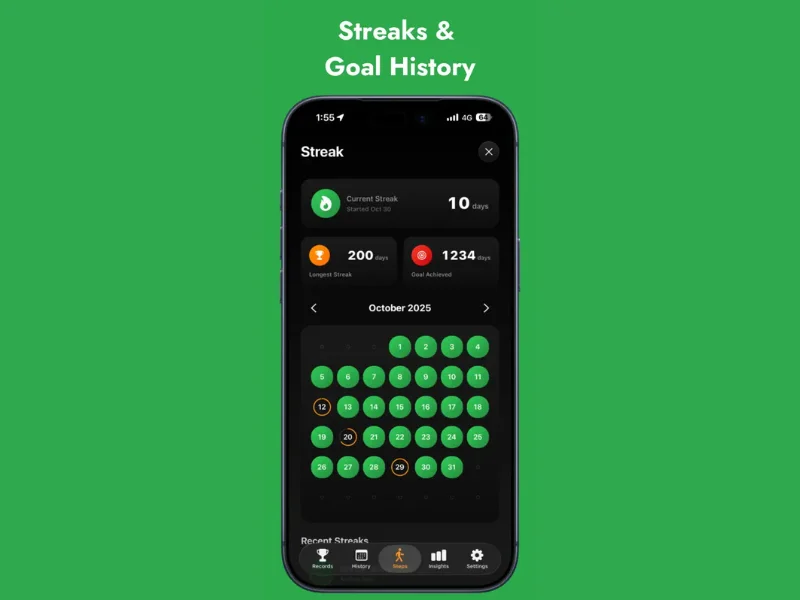
FreeSteps App makes goal setting simple and motivating. Set your personalized daily step target and watch the animated progress ring fill as you walk. The app celebrates when you hit your goal and tracks your streaks for consecutive days of reaching your target. Beautiful widgets keep your goal visible on your home screen.
Apple Fitness+ Goals
If you use Apple Fitness+:
Activity goals:
- Move, Exercise, and Stand rings
- Daily and weekly targets
- Customizable difficulty
How to adjust:
- Open Fitness app
- Tap your profile
- Adjust goals in settings
Pacer Goal Setting
Pacer offers comprehensive goals:
Step goals:
- Set daily step target
- Weekly goals available
- Progress tracking
- Social challenges
Additional goals:
- Distance goals
- Time-based goals
- Weight goals
Pedometer++ Goals
Simple and effective:
Setting goals:
- Open app settings
- Set daily step target
- Enable notifications
- Track progress
General Third-Party App Steps
Most fitness apps follow similar patterns:
- Open the app
- Navigate to Settings or Goals
- Find step goal option
- Enter your target number
- Save and enable notifications
How to Choose Realistic and Safe Targets
The right goal motivates without discouraging.
Assess Your Current Activity
Start with your baseline:
Find your average:
- Check last 2-4 weeks of data
- Calculate daily average
- Note your range (lowest to highest)
- Identify typical days vs. exceptional days
Example baseline:
- Average: 4,500 steps
- Range: 2,000 to 7,000 steps
- Most days: 4,000-5,000 steps
The 10% Rule
Increase gradually:
How it works:
- Add 10% to your current average
- Maintain for 1-2 weeks
- Increase again by 10%
- Repeat until at target
Example progression:
- Week 1-2: 4,500 steps (baseline)
- Week 3-4: 5,000 steps (+10%)
- Week 5-6: 5,500 steps (+10%)
- Week 7-8: 6,000 steps (+10%)
Benefits:
- Manageable increases
- Body adapts gradually
- Sustainable progress
- Reduces injury risk
Consider Your Lifestyle
Be realistic about your life:
Factors to consider:
- Work schedule (desk job vs. active)
- Family responsibilities
- Commute type
- Available free time
- Physical limitations
Adjust accordingly:
- Busy professionals: start lower
- Already active: can aim higher
- Health conditions: consult doctor
- Seasonal changes: adjust as needed
A goal you can achieve 80% of the time is better than an ambitious goal you rarely hit. Consistent success builds motivation and habit, while constant failure leads to giving up.
Recommended Step Targets
General guidelines by goal:
Age-Adjusted Targets
Consider age when setting goals:
These are general guidelines. Individual ability varies.
Safety Considerations
Avoid overreaching:
Warning signs of too much:
- Persistent fatigue
- Joint or muscle pain
- Decreased motivation
- Dreading walking
When to scale back:
- Pain that does not resolve
- Exhaustion affecting daily life
- Missing goal consistently
- Feeling overwhelmed
When to consult a doctor:
- Starting after long inactivity
- Existing health conditions
- Significant pain
- Age 65+ starting new program
Adjusting Over Time
Goals should evolve:
When to increase:
- Consistently hitting goal (90%+ of days)
- Goal feels easy
- Ready for more challenge
- Health has improved
When to decrease:
- Consistently missing goal
- Life circumstances changed
- Health issues arose
- Feeling burned out
Seasonal adjustments:
- Summer: may naturally walk more
- Winter: may need lower goal
- Holidays: temporary adjustments
- Vacation: different expectations
How to Monitor Progress Each Week
Tracking keeps you accountable and informed.
Weekly Review Process
Set aside time for review:
Weekly check-in:
- Review daily step counts
- Calculate weekly average
- Note days you hit goal
- Identify patterns
- Plan adjustments if needed
What to look for:
- Percentage of days at goal
- Best and worst days
- Trends (improving or declining)
- Obstacles that prevented walking
Understanding Your Data
Make sense of the numbers:
Success metrics:
- 80%+ of days at goal = sustainable
- 60-80% = may need adjustment
- Below 60% = goal too high or barriers exist
Pattern recognition:
- Which days are hardest?
- What time of day do you walk most?
- What helps you succeed?
- What prevents walking?
Using App Insights
Leverage app features:
Common insights available:
- Weekly and monthly summaries
- Trend graphs
- Best days and streaks
- Comparison to previous periods
How to use insights:
- Celebrate improvements
- Identify problem areas
- Adjust strategies
- Stay motivated
Do not obsess over daily numbers. Some days will be lower due to illness, weather, or life events. Focus on weekly trends and long-term progress rather than individual days.
Celebrating Milestones
Acknowledge achievements:
Worth celebrating:
- First week at goal
- First month of consistency
- New personal record
- Streak achievements
- Reaching a major target
How to celebrate:
- Acknowledge the accomplishment
- Share with supportive people
- Treat yourself appropriately
- Use it as motivation to continue
Troubleshooting Low Weeks
When you fall short:
Analyze what happened:
- Was the goal too high?
- Were there unusual circumstances?
- Did motivation drop?
- Were there practical barriers?
Develop solutions:
- Adjust goal if needed
- Plan for obstacles
- Renew motivation
- Remove barriers
Move forward:
- Do not dwell on failure
- Each week is a fresh start
- Learn and improve
- Stay positive
Long-Term Tracking
Look at the big picture:
Monthly reviews:
- Compare to previous months
- Note seasonal patterns
- Celebrate long-term progress
- Adjust annual goals
Quarterly check-ins:
- Assess overall progress
- Evaluate goal appropriateness
- Plan next quarter
- Celebrate achievements
Tips for Goal Success
Strategies to help you hit your targets.
Make It Visible
Keep your goal front and center:
- Use home screen widgets
- Check progress multiple times daily
- Set reminders
- Post goal where you see it
Build Walking Into Routine
Make walking automatic:
- Same time each day
- Link to existing habits
- Schedule walking time
- Protect walking appointments
Have Backup Plans
Prepare for obstacles:
- Indoor walking options for bad weather
- Short walks when time is limited
- Walking meetings for busy days
- Alternatives when traveling
Find Accountability
Others can help:
- Share goals with family
- Walk with friends
- Join walking challenges
- Post progress on social media
Stay Flexible
Adapt without giving up:
- Adjust goals when needed
- Accept imperfect days
- Focus on progress, not perfection
- Maintain long-term perspective
The Bottom Line
Setting daily step goals on your phone provides structure and motivation for increasing your activity. Whether you use the iPhone Health app, Steps App, or another fitness app, the key is choosing a realistic target and monitoring your progress consistently. Start with your current baseline, increase gradually, and adjust as needed.
Key takeaways:
- iPhone Health app tracks steps but lacks built-in step goals
- Third-party apps like Steps App offer customizable step goals
- Start with your current average and increase by 10% at a time
- Choose goals you can hit 80% of the time
- Review progress weekly and adjust as needed
- Celebrate milestones and learn from setbacks
- Stay flexible and maintain long-term perspective
Set your step goal today and start walking toward better health.
References
Free calculators for this topic
Related Posts
How to Set Realistic Step Goals on iPhone: Beginner's Framework
Learn why 10,000 steps might not be the right first goal, how to find your baseline, and how to set and adjust step goals using success streaks to build confidence.

How To Set Realistic Walking Goals
Learn how to define goals based on fitness level, break goals into weekly targets, increase difficulty safely, and evaluate and reset goals each month.

How To Use Apple Health For Accurate Step Tracking
Learn how Apple Health collects and displays steps, how to view long-term trends and averages, how to connect third-party apps, and how to improve the accuracy of Apple Health data.