
Best iPhone Pedometer Apps For 2025

Discover the top free and premium pedometer apps for iPhone, explore advanced features, learn how to choose the best app for your goals, and understand why step tracking apps keep you more active.
While your iPhone already counts steps through the Health app, dedicated pedometer apps offer enhanced features, better visualization, and more motivation to stay active. The right app can transform step counting from a passive data point into an engaging fitness tool.
Here are the best iPhone pedometer apps for 2025 and how to choose the right one for you.
Top Free Pedometer Apps to Consider
These apps offer excellent step tracking without requiring payment.
Steps App
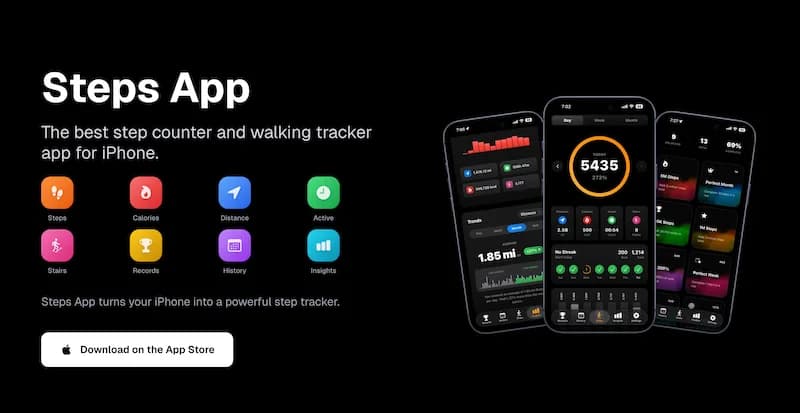
Steps App stands out as a top choice for iPhone users who want a clean, focused step tracking experience.
Key features:
- Automatic step counting via Apple Health
- Beautiful animated step ring visualization
- Home screen and lock screen widgets
- Daily, weekly, and monthly insights
- 25+ achievements to earn
- Customizable daily step goals
- Distance, calories, and active time tracking
- Floors climbed tracking
Why it stands out:
- Privacy-focused design (no data collection)
- Battery-efficient operation
- Clean, intuitive interface
- Multiple widget sizes and styles
- No account required
Best for: Users who want a straightforward, privacy-respecting step counter with beautiful widgets and motivating achievements.
Steps App
FreeSteps App combines accurate step tracking with a gorgeous interface and powerful widgets. See your progress at a glance on your home screen, earn achievements for consistency, and enjoy detailed insights into your walking patterns. With no data collection and minimal battery usage, it is the ideal pedometer for privacy-conscious iPhone users.
Apple Health App
The built-in Health app provides basic step tracking for everyone.
Key features:
- Pre-installed on all iPhones
- Automatic step counting
- Historical data storage
- Integration with other health data
- Basic charts and trends
Limitations:
- Limited visualization options
- No widgets for quick viewing
- Basic goal tracking
- No achievements or gamification
Best for: Users who want basic tracking without installing additional apps.
Pacer
Pacer offers a comprehensive walking and fitness tracking experience.
Key features:
- Step counting and GPS tracking
- Walking plans and programs
- Social features and groups
- Weight tracking integration
- Guided walking workouts
Considerations:
- Some features require premium subscription
- More complex interface
- Social features may not appeal to everyone
Best for: Users who want walking programs and social motivation.
Pedometer++
A long-standing favorite in the App Store.
Key features:
- Simple step counting
- Apple Watch complications
- Daily and weekly goals
- Clean interface
- Free to use
Considerations:
- Fewer features than some alternatives
- Basic visualization
Best for: Users who want simplicity and Apple Watch integration.
All these apps use the same underlying step data from your iPhone's motion sensors. The difference is in how they present and enhance that data with features like widgets, achievements, and insights.
Advanced Features Offered by Premium Apps
Some apps offer premium features worth considering.
Detailed Analytics
Premium apps often provide deeper insights:
Advanced metrics:
- Hourly step breakdowns
- Trend analysis over months
- Comparison to previous periods
- Stride length calculations
- Pace tracking
Visualization:
- Heat maps of activity
- Detailed charts and graphs
- Export options for data
- Calendar views
GPS Route Tracking
Some apps add GPS for outdoor walks:
GPS features:
- Map your walking routes
- Track exact distance
- Calculate pace per mile
- Save favorite routes
- Share routes with others
Considerations:
- Uses more battery
- Not needed for step counting
- Useful for dedicated walking sessions
Coaching and Programs
Structured walking programs:
Program types:
- Beginner walking plans
- Weight loss programs
- Training for walking events
- Interval walking workouts
Benefits:
- Progressive difficulty
- Guided instruction
- Scheduled workouts
- Goal-oriented approach
Social and Community Features
Connecting with others:
Social options:
- Friend leaderboards
- Group challenges
- Community forums
- Sharing achievements
Benefits:
- Accountability
- Motivation from competition
- Support from community
- Fun challenges
Health Integrations
Connecting with broader health tracking:
Integration examples:
- Weight tracking
- Nutrition logging
- Sleep monitoring
- Heart rate data
- Blood pressure tracking
Benefits:
- Holistic health view
- Correlation insights
- Comprehensive tracking
Most premium features are nice-to-have rather than essential. For most people, a good free app with widgets and basic insights is sufficient. Only upgrade if you will actually use the advanced features.
How to Choose the Best Pedometer App for Your Goals
Match the app to your specific needs.
For Simplicity and Privacy
If you want straightforward tracking without complexity:
Look for:
- Clean, simple interface
- No account required
- Privacy-focused data handling
- Basic but effective features
- Easy-to-read widgets
Recommended: Steps App, Pedometer++
For Motivation and Gamification
If you need extra motivation to stay active:
Look for:
- Achievement systems
- Streak tracking
- Daily challenges
- Progress celebrations
- Visual progress indicators
Recommended: Steps App, Pacer
For Weight Loss Goals
If walking is part of a weight loss plan:
Look for:
- Calorie tracking
- Integration with diet apps
- Weight logging
- Progress toward weight goals
- Walking programs for weight loss
Recommended: Pacer, MyFitnessPal integration
For Social Motivation
If competition and community help you stay active:
Look for:
- Leaderboards
- Friend connections
- Group challenges
- Sharing features
- Community support
Recommended: Pacer, Strava
For Apple Watch Users
If you also use an Apple Watch:
Look for:
- Watch app or complication
- Sync between devices
- Watch-specific features
- Unified data view
Recommended: Pedometer++, Apple Fitness
For Data Enthusiasts
If you love detailed analytics:
Look for:
- Comprehensive charts
- Data export options
- Historical comparisons
- Advanced metrics
- Trend analysis
Recommended: Steps App (insights feature), Pacer (premium)
For Beginners
If you are new to step tracking:
Look for:
- Simple setup
- Clear interface
- Helpful onboarding
- Reasonable default goals
- Encouraging feedback
Recommended: Steps App, Apple Health
Comparison Table
Why Step Tracking Apps Keep You More Active
Understanding the psychology helps you use apps effectively.
The Feedback Loop
Seeing your steps creates motivation:
How it works:
- You check your step count
- You see you are close to goal
- You take extra steps to reach it
- You feel accomplishment
- You want to repeat the feeling
Research shows:
- People who track steps walk 2,000+ more steps daily
- Feedback increases activity levels
- Visual progress is motivating
Goal Setting Power
Having a target changes behavior:
Why goals work:
- Creates specific target to aim for
- Provides clear success criteria
- Enables progress tracking
- Builds momentum
Effective goals:
- Specific (10,000 steps, not "walk more")
- Achievable but challenging
- Adjustable as fitness improves
- Daily rather than weekly
Accountability Effect
Tracking creates accountability:
You are accountable to:
- Your recorded data
- Your streaks and achievements
- Your past performance
- Yourself
How apps enhance this:
- Visible record of activity
- Streak tracking (do not break the chain)
- Historical comparisons
- Progress toward goals
Be careful not to become obsessive about step counts. The goal is improved health, not perfect numbers. Missing a day or falling short of a goal occasionally is normal and healthy.
Gamification Benefits
Game-like elements increase engagement:
Gamification features:
- Achievements and badges
- Levels or milestones
- Challenges and competitions
- Rewards for consistency
Why they work:
- Tap into natural competitiveness
- Provide sense of accomplishment
- Make activity feel like a game
- Create short-term rewards for long-term behavior
Visual Progress
Seeing progress visually is powerful:
Effective visualizations:
- Progress rings that fill
- Charts showing trends
- Streaks displayed prominently
- Goal completion indicators
Benefits:
- Immediate feedback
- Satisfying to watch progress
- Clear understanding of status
- Motivation to complete
Habit Formation
Apps help build lasting habits:
How tracking builds habits:
- Creates consistent cue (checking the app)
- Provides routine (daily walking)
- Delivers reward (seeing progress)
- Reinforces over time
Long-term benefits:
- Walking becomes automatic
- Less reliance on motivation
- Sustainable behavior change
- Improved health outcomes
Getting the Most from Your Pedometer App
Tips for effective use.
Set Up Widgets
Put your step count where you will see it:
- Home screen widget for frequent viewing
- Lock screen widget for quick glances
- Choose size that shows useful information
- Position prominently
Choose Realistic Goals
Start with achievable targets:
- Begin with current average plus 1,000-2,000 steps
- Increase gradually over weeks
- Adjust based on lifestyle
- Do not set impossible goals
Check Regularly but Not Obsessively
Find the right balance:
Helpful:
- Morning check to see starting point
- Midday check to assess progress
- Evening check to see if goal is close
Unhelpful:
- Checking every few minutes
- Anxiety about numbers
- Obsessive monitoring
Use Achievements as Motivation
Let achievements encourage you:
- Celebrate when you earn them
- Work toward specific achievements
- Do not stress about missing some
- Enjoy the gamification
Review Insights Weekly
Look at trends, not just daily numbers:
- Weekly averages matter more than daily
- Identify patterns in your activity
- Notice what helps you walk more
- Adjust approach based on data
The Bottom Line
The best pedometer app is the one you will actually use consistently. While all apps access the same step data from your iPhone, features like widgets, achievements, and insights can significantly impact your motivation and success. Choose an app that matches your goals, personality, and preferences.
Key takeaways:
- Free apps like Steps App offer excellent features without cost
- Widgets are crucial for keeping step count visible and motivating
- Achievements and gamification help maintain motivation
- Privacy-focused apps protect your health data
- The right app can help you walk 2,000+ more steps daily
- Match app features to your specific goals and personality
- Consistency matters more than finding the "perfect" app
Download a step tracking app today and start your journey to a more active lifestyle.
References
Free calculators for this topic
Related Posts

How Tracking Steps Helps With Accountability
Learn why numbers improve consistency, how to use apps and wearables for tracking, how to set up tracking-based challenges, and how to review progress and adjust goals.
How To Use Apple Health For Accurate Step Tracking
Learn how Apple Health collects and displays steps, how to view long-term trends and averages, how to connect third-party apps, and how to improve the accuracy of Apple Health data.
How To Save Battery While Tracking Steps
Learn how step tracking uses your phone sensors, how to optimize battery settings, which features drain the most power, and discover low power step tracking best practices.