

How Tracking Steps Helps With Accountability

Learn why numbers improve consistency, how to use apps and wearables for tracking, how to set up tracking-based challenges, and how to review progress and adjust goals.
What gets measured gets managed. This simple principle explains why step tracking is so powerful for building consistent walking habits. When you track your steps, you create accountability to yourself. You see exactly what you are doing, and that visibility drives behavior change.
Here is how tracking steps helps with accountability and how to use it effectively.
Why Numbers Improve Consistency
The psychology of measurement.
The Hawthorne Effect
Observation changes behavior:
The principle:
- People behave differently when observed
- Even self-observation counts
- Tracking creates awareness
- Awareness drives improvement
Applied to walking:
- Knowing you will see your step count changes behavior
- Low numbers motivate more effort
- High numbers reinforce good behavior
- Consistent tracking creates consistent walking
Objective Feedback
Numbers do not lie:
Benefits of objective data:
- No guessing or estimating
- Clear picture of actual activity
- Removes self-deception
- Shows patterns over time
Common realizations:
- "I thought I walked more than that"
- "I am more active on weekends"
- "Bad weather really affects me"
- "I walk most in the morning"
Studies show that people consistently overestimate their physical activity levels. Step tracking provides objective data that reveals the truth and helps you make accurate assessments.
Progress Visibility
Seeing improvement motivates:
What tracking shows:
- Daily step counts
- Weekly averages
- Monthly trends
- Long-term progress
Motivation from progress:
- Seeing numbers increase feels good
- Progress creates momentum
- Small improvements add up
- Visual proof of effort
Goal Clarity
Numbers make goals concrete:
Vague vs. specific:
- Vague: "Walk more"
- Specific: "Walk 8,000 steps daily"
Benefits of specific goals:
- Know exactly what to aim for
- Know when you have succeeded
- Can measure progress toward goal
- Creates clear accountability
How to Use Apps and Wearables for Tracking
Choose and use your tracking tools effectively.
Smartphone Tracking
Your phone is a step counter:
Built-in options:
- iPhone Health app
- Google Fit on Android
- Samsung Health
- Automatic background tracking
Advantages:
- No extra device needed
- Always with you
- Free to use
- Syncs with other apps
Limitations:
- Must carry phone
- Less accurate for some activities
- Battery usage
- May miss steps if phone is stationary
Dedicated Step Counter Apps
Apps designed for step tracking:
What to look for:
- Clean, easy-to-read interface
- Daily, weekly, monthly views
- Goal setting features
- Achievement and streak tracking
- Widget for quick viewing
Popular features:
- Progress rings or bars
- Historical data
- Trend analysis
- Motivational notifications

Steps App
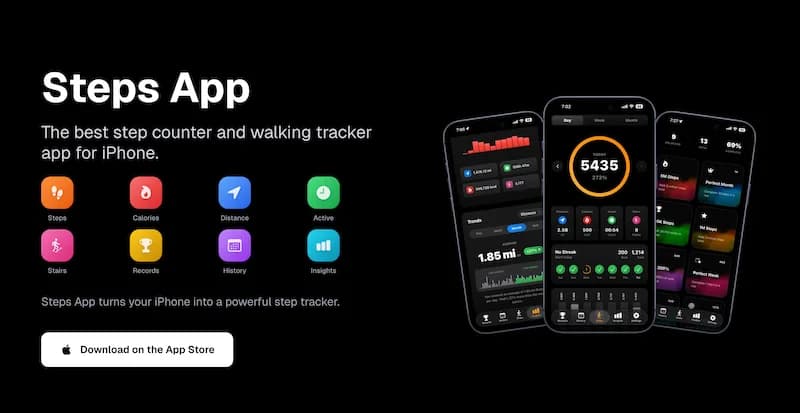
FreeSteps App provides beautiful step tracking with an animated progress ring that fills as you walk. See your daily, weekly, and monthly trends at a glance. The home screen widget keeps your step count visible without opening the app, and smart notifications celebrate when you hit your goal. Privacy-friendly design means your data stays on your device.
Fitness Trackers and Smartwatches
Wearable devices for tracking:
Types of devices:
- Basic fitness bands
- Advanced fitness trackers
- Smartwatches
- Hybrid watches
Advantages:
- Worn on wrist, always tracking
- More accurate for various activities
- Additional metrics (heart rate, sleep)
- Glanceable step count
Considerations:
- Additional cost
- Requires charging
- Learning curve
- Syncing requirements
Choosing Your Tracking Method
Find what works for you:
Consider your lifestyle:
- Do you always carry your phone?
- Would you wear a device daily?
- What is your budget?
- What features matter most?
Start simple:
- Begin with phone tracking
- Upgrade if needed
- Consistency matters more than device
- Any tracking is better than none
The best tracking method is the one you will actually use consistently. A simple phone app used daily is more effective than an expensive fitness tracker that sits in a drawer.
How to Set Up Tracking Based Challenges
Use tracking to create motivating challenges.
Personal Challenges
Challenge yourself:
Daily step challenges:
- Hit your goal every day for a week
- Increase daily goal by 500 steps
- No days below a minimum threshold
- Beat yesterday's count
Weekly challenges:
- Total weekly step goal
- Average daily steps target
- Specific number of 10,000+ days
- One long walk per week
Monthly challenges:
- Total monthly steps
- Consistency streak
- Progressive increase
- New personal record
Streak Challenges
The power of consecutive days:
Building streaks:
- Hit daily goal every day
- Start with achievable goal
- Track streak length
- Celebrate milestones
Streak milestones:
- 7-day streak
- 14-day streak
- 30-day streak
- 100-day streak
Protecting your streak:
- Have a minimum effort option
- Plan for busy days
- Do not let one miss become two
- Start fresh after breaks
Competition Challenges
Compete with others:
With friends and family:
- Weekly step competitions
- Team challenges
- Couples or family challenges
- Friendly rivalries
Workplace challenges:
- Department competitions
- Company-wide events
- Team building activities
- Wellness program challenges
Online communities:
- App-based challenges
- Social media groups
- Virtual walking events
- Online fitness communities
Charity and Purpose Challenges
Walk for a cause:
Charity step challenges:
- Pledge per step or mile
- Walk for fundraising events
- Team charity challenges
- Virtual charity walks
Purpose-driven walking:
- Walk to support a cause
- Memorial or tribute walks
- Awareness campaigns
- Community events
How to Review Progress and Adjust Goals
Use data to improve continuously.
Regular Review Schedule
When to check your data:
Daily review:
- Quick check of step count
- End of day assessment
- Did you hit your goal?
- What worked or did not?
Weekly review:
- Total weekly steps
- Daily average
- Best and worst days
- Patterns and trends
Monthly review:
- Monthly total and average
- Progress toward goals
- Comparison to previous months
- Goal adjustment needed?
What to Look For
Key insights from your data:
Patterns:
- Which days are highest?
- Which days are lowest?
- What time do you walk most?
- What affects your activity?
Trends:
- Are you improving over time?
- Are you maintaining consistency?
- Any concerning declines?
- Seasonal variations?
Correlations:
- Weather and activity
- Work schedule and steps
- Sleep and activity
- Mood and walking
Do not obsess over daily fluctuations. Some days will naturally be lower than others. Focus on weekly averages and long-term trends rather than stressing about individual days.
Adjusting Goals
When and how to change targets:
When to increase goals:
- Consistently exceeding current goal
- Goal feels too easy
- Ready for more challenge
- Health has improved
When to decrease goals:
- Consistently failing to meet goal
- Goal causes stress or injury
- Life circumstances changed
- Need to rebuild momentum
How to adjust:
- Change by small increments (500-1,000 steps)
- Give new goal 2-4 weeks before adjusting again
- Consider seasonal adjustments
- Be realistic about your life
Using Data for Motivation
Turn numbers into motivation:
Celebrate achievements:
- New personal records
- Streak milestones
- Monthly totals
- Improvement over time
Learn from struggles:
- Identify problem patterns
- Understand what causes low days
- Develop strategies for challenges
- Do not judge, just learn
Share your progress:
- Tell supportive people
- Post milestones if comfortable
- Inspire others
- Build community
Common Tracking Mistakes to Avoid
Pitfalls that undermine accountability.
Obsessing Over Numbers
Balance is key:
Signs of unhealthy tracking:
- Anxiety about step count
- Walking when injured
- Neglecting other priorities
- Feeling like a failure for low days
Healthy approach:
- Numbers inform, not define you
- Some flexibility is okay
- Rest days are important
- Overall trend matters most
Inconsistent Tracking
Gaps undermine accountability:
Problems with inconsistent tracking:
- Incomplete data
- Cannot see true patterns
- Easy to forget progress
- Accountability breaks down
Solutions:
- Make tracking automatic
- Wear device or carry phone always
- Check app daily
- Build tracking into routine
Ignoring the Data
Tracking without reviewing:
Common pattern:
- Track steps daily
- Never look at weekly or monthly data
- Miss important patterns
- Do not adjust based on insights
Better approach:
- Schedule regular reviews
- Look at trends, not just daily
- Use insights to improve
- Adjust goals based on data
The Bottom Line
Tracking steps creates accountability that drives consistent walking habits. Numbers provide objective feedback, make goals concrete, and show progress over time. Use apps, phones, or wearables to track automatically. Set up personal challenges, streaks, and competitions to stay engaged. Review your data regularly to understand patterns and adjust goals appropriately. The key is consistent tracking combined with regular reflection and adjustment.
Key takeaways:
- What gets measured gets managed
- Objective data reveals the truth about your activity
- Visible progress creates motivation
- Choose tracking tools you will use consistently
- Set up challenges to stay engaged
- Build and protect streaks for momentum
- Review data weekly and monthly
- Adjust goals based on what you learn
- Avoid obsessing over daily numbers
- Focus on long-term trends and consistency
Start tracking today and watch your accountability transform your walking habit.
References
Free calculators for this topic
Related Posts

How To Stay Motivated To Walk Every Day
Learn how to set goals that keep you engaged, how rewards and gamification help, how social accountability boosts consistency, and how to push through low motivation days.
Best iPhone Pedometer Apps For 2025
Discover the top free and premium pedometer apps for iPhone, explore advanced features, learn how to choose the best app for your goals, and understand why step tracking apps keep you more active.

30 Day Walking Challenge Ideas For Real Results
Discover why 30-day challenges boost motivation, get a sample beginner-friendly 30-day plan, explore fun themed challenges to try, and learn how to measure and celebrate progress.